
Your child needs math practice, but worksheets feel boring and slow. You search for a free site that starts fast and needs no sign-up.
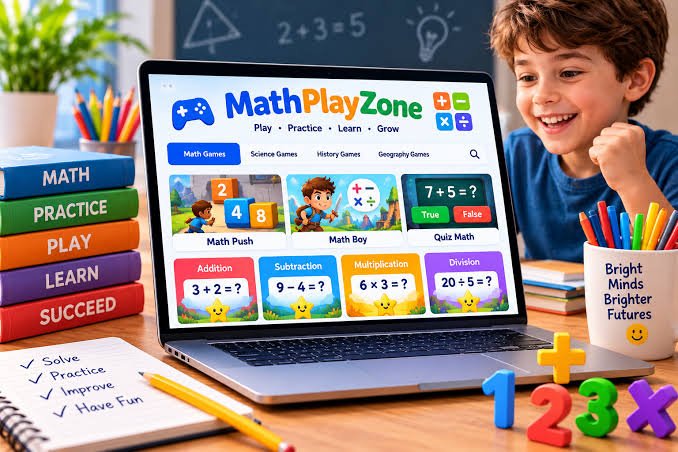
MathPlayZone is one name you will find in those results. It is a specific website, mathplayzone.com, with browser games for learning and fun.
This name causes confusion, so this guide clears it up first. You will learn what it is, what it is not, how it works, and how to use it well.
What Is MathPlayZone?
MathPlayZone is a free, web-based game site for kids. According to MathPlayZone.com, it is an interactive platform designed for both learning and fun.
You open the site in a browser and pick a game. You do not need to download an app or install software to start playing.
It is not a Math Playground, and it is not Math Play. Those are separate websites with similar names, different games, and different owners.
It is also not a classroom corner or a physical play area. In this keyword, the name refers to the online website, not a place in a school.
Here is a small example of how the math works. In Let’s Reach 1000, you keep adding numbers to reach exactly 1,000 before time runs out.
For example, 425 + 275 = 700, and 700 + 300 = 1,000. You practice fast addition while you race the clock, not while you fill a worksheet.
| Name | What It Actually Is |
| MathPlayZone | The site at mathplayzone.com, focused on timed math games |
| Math Playground | A different math games website, not the same site |
| Math Play | Another separate math games website, at math-play.com |
| A math play zone | A general phrase for a play area, not this website |
Why MathPlayZone Matters for Families and Classrooms
Many paid learning apps work well, but not every family needs another subscription. A free, no-login option matters when you only need short, focused practice.
It Removes the Sign-Up Barrier
There is no account step standing between your child and practice. An adult opens the site, picks a game, and the child can start in under a minute.
That speed helps in real life. If homework starts at 4:00 p.m., you do not lose ten minutes creating a username and password first.
It Builds Fact Fluency, Not Just Answers
Fact fluency means recalling basic facts quickly and correctly. A child who knows 7 × 8 = 56 fast has more mental energy for harder problems later.
Timed games push that recall. The child must choose the correct sum, difference, product, or quotient before the timer ends, so guessing slowly stops working.
Try this quick check at home. If your child answers 18 of 20 problems right, the score tells you more than “good job” does.
Accuracy = (Correct Answers ÷ Total Questions) × 100
So, 18 ÷ 20 = 0.90, and 0.90 × 100 = 90% accuracy. You now have a simple number you can compare next week.
It Fits Short Practice Sessions
Long study sessions often fail with younger kids. Short sessions are easier to repeat, and repeat practice is what builds speed and confidence over time.
For example, 15 minutes a day for 4 days equals 60 minutes that week. That is 15 × 4 = 60 minutes of practice without one long, tiring session.
It Works on Common School Devices
The games run in a web browser, so they fit normal home and school setups. Families often use them on a laptop, tablet, or classroom Chromebook.
What Games Can You Play on MathPlayZone?
The site groups its games by subject, not by a personal learning path. An adult or child chooses the game, so picking the right one matters.
Timed Addition, Subtraction, Multiplication, and Division Games
These are the simplest games on the homepage. You solve a problem, select the correct answer, and try to score more before time runs out.
Each game focuses on one operation. If this week’s school topic is division, you can practice division only.
Math Boy
According to MathPlayZone.com, Math Boy is a fantasy-themed game with a sword-wielding boy. You solve equations to stop enemies from attacking him during play.
It offers five modes: addition, subtraction, multiplication, division, or a mix. The mix mode works best after a child has practiced each operation alone first.
Math Push and Quiz Math
Math Push is a puzzle game about planning, not just speed. You push numbered blocks to build expressions that match the value shown on a barricade.
Quiz Math works in the opposite way. You see a simple addition or subtraction equation and decide fast whether it is true or false.
Let’s Reach 1000 and Let’s Reach Zero
Let’s Reach 1000 builds number sense through a running total. You keep adding numbers and watch how close you get to 1,000.
Let’s Reach Zero reverses that task. You subtract numbers turn by turn until the total reaches exactly zero.
| Game | Main Skill | Best Use |
| Addition, Subtraction, Multiplication, Division | One operation at a time | Fast, focused fact practice |
| Math Boy | Mixed operations in an adventure game | Kids who want action with math |
| Math Push | Building expressions and planning | Kids who like puzzles more than speed |
| Quiz Math | Checking if equations are true or false | Quick mental math checks |
| Let’s Reach 1000 | Adding toward a target total | Number sense and estimation |
| Let’s Reach Zero | Subtracting toward zero | Careful subtraction practice |
Science, History, and Geography Games
The site is not math only, despite its name. Science games include The Brain Lab, a runner game about solid, liquid, and gas states of matter.
It also lists Smarty Pants quiz games for science and history. The science quiz covers topics such as planets and the human body, according to the site.
For geography, there is a quiz about countries, capitals, and landmarks. Flags Maniac asks players to identify flags of different countries.
The Magic of Science has 30 interactive levels, according to MathPlayZone.com. That is a set level count, not a full science curriculum.
The Arcade Section
The arcade section holds general games for breaks, not math lessons. The site lists this section separately, and its arcade category shows many non-math titles.
This matters for parents and teachers to know early. A child sent to practice multiplication can wander into arcade games if no adult sets a clear rule first.
Cost, Accounts, and Progress Tracking
The games are free to open and play on the official site. At the time of writing, the site shows no subscription or paywall before a game starts.
There is also no student account system on the public site. That means there is no built-in parent dashboard to save scores or track progress over time.
Some third-party review sites claim this platform offers personal dashboards and adaptive paths. Do not rely on those claims, because the official site does not show them.
Always confirm current features on mathplayzone.com itself. Features on free websites can change without notice.
How to Use MathPlayZone Step by Step
You get the best results when an adult picks the goal first. Follow these steps to turn random play into real, measurable practice at home or school.
Step 1: Pick One Skill for the Session
Choose only one skill before you open the site. For example, pick multiplication facts from 6 to 9, not “all math” for the whole session.
Write the goal in one short line. A clear goal helps you choose the right game.
Step 2: Open the Site and Choose the Right Game
Go to mathplayzone.com in your browser. Then pick the game that matches your goal, such as the multiplication game or Math Boy in multiplication mode.
Avoid starting in the arcade section for a practice session. Save arcade games for a short break after the math work is finished, if you allow them.
Step 3: Set a Time Limit Before Play Starts
Agree on the time before the first game begins. For younger kids, 10 to 15 minutes is a practical starting point for one focused session.
Use a timer your child can see. A visible timer prevents arguments about when play should end.
Step 4: Play One Round and Record the Score
Let your child play one full round without help. Then write down two numbers: how many answers were correct, and how many questions there were in total.
For example, 14 correct out of 20 is your starting point. You cannot measure progress if you never record a starting number.
Step 5: Calculate Accuracy and Speed
Now do the math on that score together. This turns a fun game into useful feedback.
Accuracy = (Correct Answers ÷ Total Questions) × 100
If the score was 14 out of 20, then 14 ÷ 20 = 0.70, and 0.70 × 100 = 70% accuracy for that round.
Correct Answers Per Minute = Correct Answers ÷ Minutes Played
If those 14 correct answers took 2 minutes, then 14 ÷ 2 = 7 correct answers per minute. Track both numbers, because speed without accuracy is not real progress.
Step 6: Repeat, Compare, and Stop on Time
Play the same game again in the next session, not five different games. Playing the same game makes the two scores fair and easy to compare.
If accuracy rises but speed falls a little, that trade is usually fine. Beginners should build careful habits first.
A Practical Example: One Week of Multiplication Practice
This is an illustrative example, not real data from a real child. It shows how a parent in the United States might use the site for one week.
Imagine your fourth grader, Emma, struggles with multiplication facts. She often pauses on 6 × 7, 7 × 8, and 8 × 9 during her homework.
Her parent sets a simple plan for Monday to Thursday. Each day, Emma plays the multiplication game for 15 minutes right after her afternoon snack.
On Monday, Emma answers 20 questions and gets 13 right. Her accuracy is 13 ÷ 20 × 100 = 65%, and her total practice time is 15 minutes.
On Thursday, she gets 17 out of 20 right in the same game. Her accuracy is 17 ÷ 20 × 100 = 85%, and her answers also feel faster to her.
Her total time is easy to calculate. 15 minutes × 4 days = 60 minutes of focused practice in four short sessions.
The total cost for the week is also simple. The site charges $0 to play, so 4 sessions × $0 = $0 spent on the practice tool itself.
| Day | Game | Time | Score | Accuracy |
| Monday | Multiplication | 15 minutes | 13 out of 20 | 65% |
| Tuesday | Multiplication | 15 minutes | 15 out of 20 | 75% |
| Wednesday | Multiplication | 15 minutes | 16 out of 20 | 80% |
| Thursday | Multiplication | 15 minutes | 17 out of 20 | 85% |
| Total | 4 sessions | 60 minutes | — | Cost: $0 |
Common Mistakes and How to Avoid Them
- Mistake 1: Confusing it with Math Playground or Math Play. These are different websites, so check the address bar and make sure it says mathplayzone.com before your child starts.
- Mistake 2: Letting your child pick any game at random. Random play rarely targets a weak skill, so an adult should pick the game from the day’s goal first.
- Mistake 3: Using it as the only math teaching tool. These games build speed and practice, but a teacher or parent should still explain new concepts first.
- Mistake 4: Chasing speed while accuracy stays low. Fast wrong answers do not build fluency, so praise correct answers first and let speed grow over time.
- Mistake 5: Never recording scores from any session. Without written scores, you cannot see progress, so keep a simple paper log or phone note each day.
- Mistake 6: Ignoring the arcade section during practice time. Arcade games are for breaks, not practice, so set that rule clearly before the session starts each time.
Frequently Asked Questions About MathPlayZone
Is MathPlayZone really free to use?
Yes. The games are free to open and play, with no payment shown before a game starts. Check the official site directly, because free sites can change later.
Do kids need an account or login to play?
No. You open mathplayzone.com, choose a game, and play in the browser. There is no saved profile, so scores are not stored for you automatically.
What ages and grades is MathPlayZone best for?
It fits elementary and early middle school children best. The core games cover addition, subtraction, multiplication, and division. Older students may find most games too simple.
Can teachers use MathPlayZone in the classroom?
Yes. It works well for short practice or station time on classroom devices, because it needs no login. Teachers should pick the game and set arcade rules first.
Does MathPlayZone replace math lessons or homework?
No. The games give practice on facts a child has already learned in class. Use it as a supplement, meaning extra support added to regular teaching.
Conclusion
MathPlayZone is a simple, free website with timed math games. It also adds science, history, geography, and arcade games, which makes the name slightly misleading at first.
Its main strength is easy access with no account and no cost. Its main limit is the lack of saved progress, so adults must track scores themselves.
Used well, it turns short daily sessions into measurable practice. Accuracy and speed formulas give you real numbers, not just a feeling that practice went well.
Your next step is simple and takes one minute. Open mathplayzone.com today, pick one skill your child needs, play one 15-minute round, and record the score.
Related Articles
Derbyps.Org: Derby Public Schools Website Guide
Uselegance.Co.Uk: Fashion, Beauty and Wellness Guide
MiloMagazine.Co.Uk Usa: Guide for US Readers
JustOnlineClub.Com: Website Overview and Safety